


Made for

14 Days Free Test Phase
Ready to Manage Risk on Your Trades?
Start using professional risk management today. Download the Stop Loss Manager and see how automated stop-loss rules can help you trade more consistently.
Risk Management
Why Stop Losses Matter for Your Trading
Stops are a core part of risk management, and many professional traders use them on every position because managing risk on capital comes before chasing profits.
- Help limit losses on a position during unexpected market events and news
- Remove emotional decision-making by cutting losses at predetermined levels
- Help you apply disciplined risk rules by defining your exit before you enter a trade
- Follow common trading practice, where risk management comes before profit optimization
Five Advanced Trailing Methods
Professional Risk Management Strategies
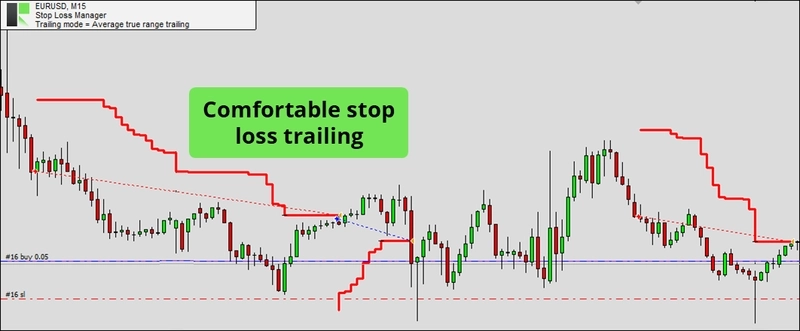
Choose from market, ATR-adjusted, SAR-based, fixed distance, or breakeven trailing methods. Each designed by experienced traders to help manage open positions in different market conditions.
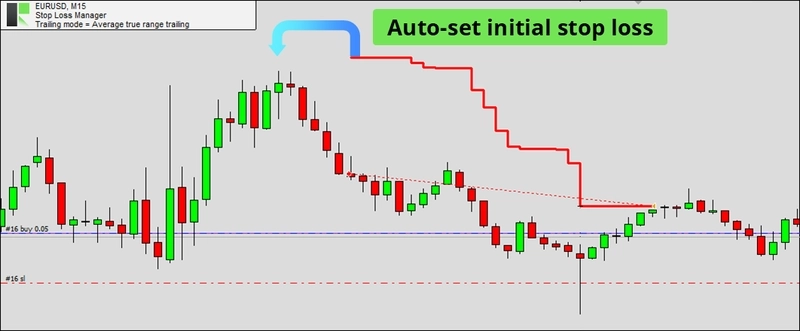
Automated Initial Stop Loss
An Initial Stop on Every Trade
The Stop Loss Manager automatically detects any trade you open and instantly applies an initial stop loss, then trails it as the position moves in your favor.
Integrates with Mobile MetaTrader
Trade Anywhere, Manage Risk Everywhere
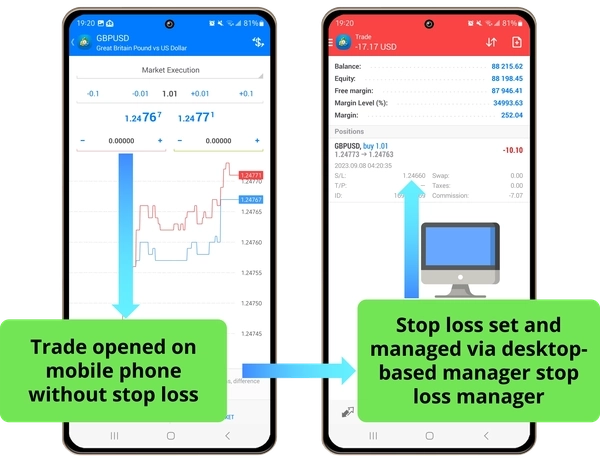
Open trades on your mobile device while the Stop Loss Manager on your desktop automatically applies your stop-loss rules, handy for acting on opportunities on the go while keeping your risk rules in place.
Success Stories
What Our Users Say
Pricing
Get Stop Loss Manager
Professional risk management for serious traders. Start applying consistent stop-loss rules today. Cancel anytime, no questions asked.
Standard plan for Stop Loss Manager
Complete stop loss automation with five advanced trailing methods.
€9 / month
All prices include taxes, fees, and shipping costs. You may cancel your subscription at any time, with cancellation taking effect at the end of your current billing period. This product is covered by our Terms and Conditions and End User License Agreement.
FAQs
Frequently Asked Questions
A stop loss is an automatic order that closes your trade when the price moves against you by a certain amount. It helps limit how much a single trade can lose. Many professional traders use stop losses because managing risk on capital comes before chasing profits.
The Stop Loss Manager provides five advanced trailing methods: Market Trailing (based on recent candlestick prices), ATR Trailing (adjusts to market volatility), Parabolic SAR Trailing (follows price direction), Fixed Distance Trailing (maintains constant distance), and Breakeven Trailing (moves stop to entry price once profitable).
Market trailing is the most straightforward for beginners. It uses the open and close prices of previous candlesticks to adjust your stop loss, giving your trades room to move while helping to limit downside. The default settings work well for most situations.
No, you cannot change the trailing method for an active trade. The Stop Loss Manager must be restarted and reconfigured with a new trailing method. This ensures consistency and prevents confusion during trade management.
Start with the default input parameters - they offer a universally applicable configuration that works well for most traders and market conditions. As you gain experience, you can use the tester mode to optimize settings for specific symbols and timeframes.
Yes! The Stop Loss Manager automatically detects any trade you open, whether from desktop or mobile MetaTrader. Once detected, it immediately applies intelligent stop losses and manages them according to your configured trailing method.
The Stop Loss Manager runs directly on your MetaTrader platform, so it continues working even if your internet briefly disconnects. However, for maximum reliability, ensure you have a stable internet connection.
Yes. The payment method you used at checkout is charged automatically at the start of every billing period, and the subscription keeps running until you cancel it yourself in the subscription management area of your user profile. You can cancel at any time, and your access stays active until the end of the period you have already paid for.
Open the subscription management area in your user profile on our website. From there you can upgrade, downgrade, or cancel your subscription at any time. Your access remains active until the end of the current billing period.